
This course provides an overview on how to reject blocks, loads, and contracts, as well as how to calculate the performance score impact based on the type of rejection and Scheduled Arrival Time (SAT). Rejections could impact your company’s Acceptance Score, which is a part of your overall Performance Score.
One element of the Performance Score is Acceptance. Acceptance measures the rate that your company accepts Amazon-tendered work. Tendered work that is rejected will negatively impact acceptance scores – this includes tendered work that expires before execution. Impacts to your company’s score are based on the days and/or hours of the rejection prior to the work Scheduled Arrival Time (SAT). A carrier might reject work at the block, load, or contract level. Each type of rejection could impact your company’s overall performance score.
A low performance score can result in losing access to Relay programs or features, such as the load board. You can find your company’s acceptance score on the Performance tab of the Scorecard page.
This course will take approximately 10 minutes to complete.
This course is mobile friendly. You can take it on your phone or on a computer. Select the cards below for tips on taking this course on your phone.
Blocks are scheduled “blocks of time” during which a carrier commits to work with Amazon. Blocks start and end in the same domicile. Trip details become available as early as 12 hours prior to SAT.
Blocks can be booked directly on the load board, or built in as a part of a contract.
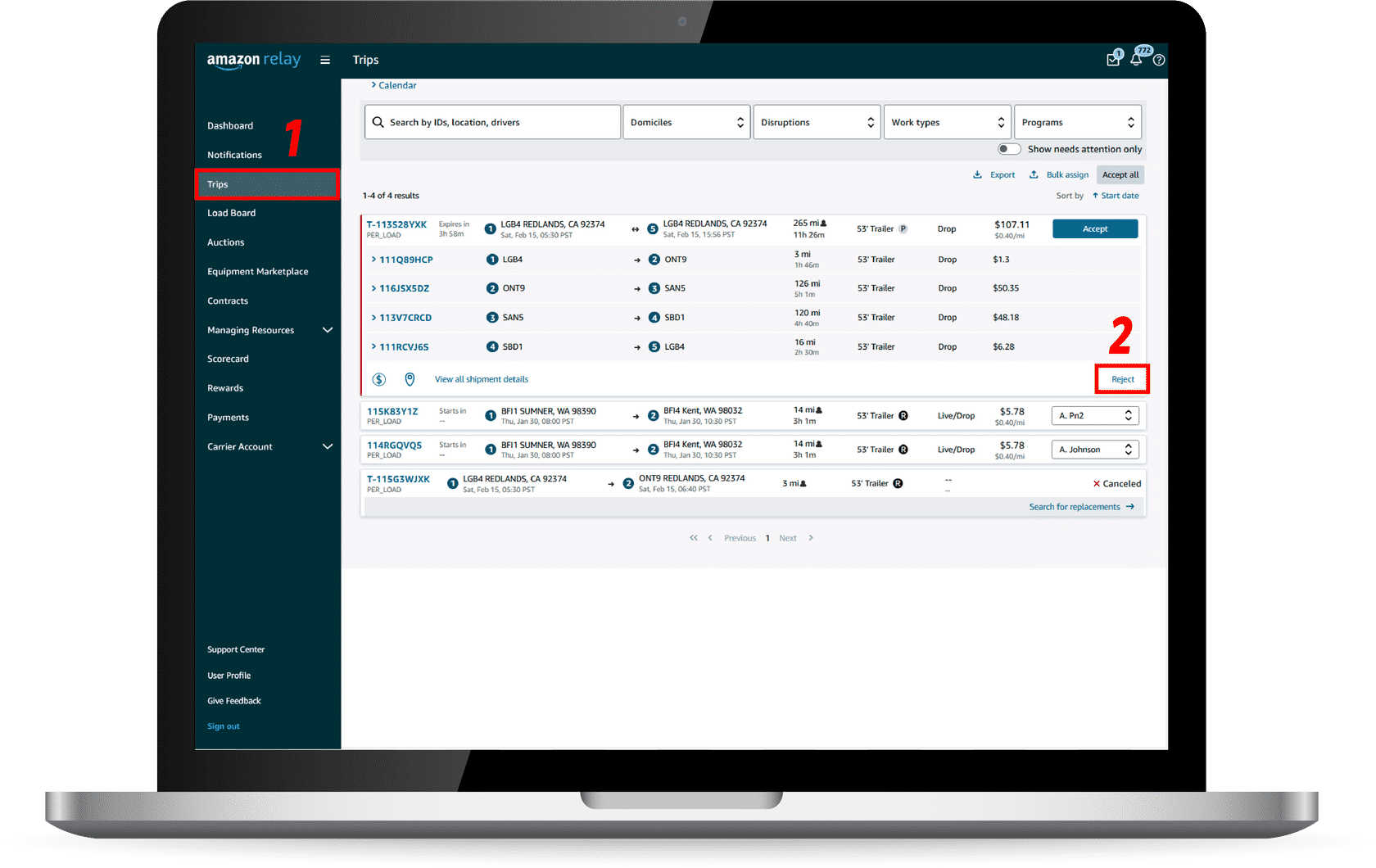
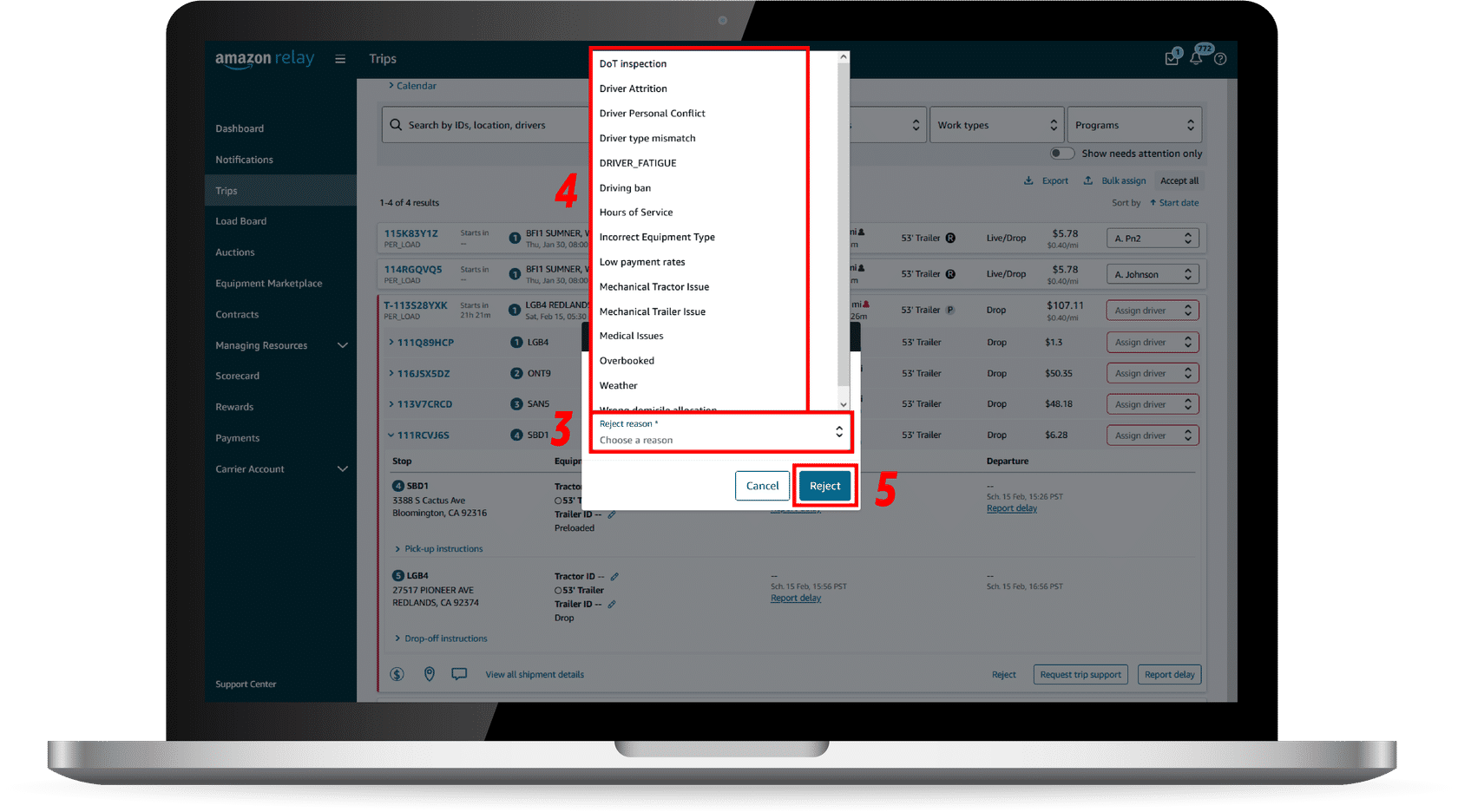
Press the arrow below to learn how to reject blocks in Relay.
For block rejections, there are two different possible Acceptance Score impacts. The impact will depend on how far in advance it was rejected:
Rejecting a trip will impact your Acceptance Score and overall Performance Score.
Once trip details are available in your account, any rejected work is considered “load level,” and will impact your company’s Acceptance score and overall Performance Score.

Steps 1 and 2 from above

Steps 3 and 4 from above

For load level rejections, there are three different possible Acceptance Score impacts. The impact will depend on how far in advance the load was rejected:
Press the (+) icons below to learn more about each of these rejections.
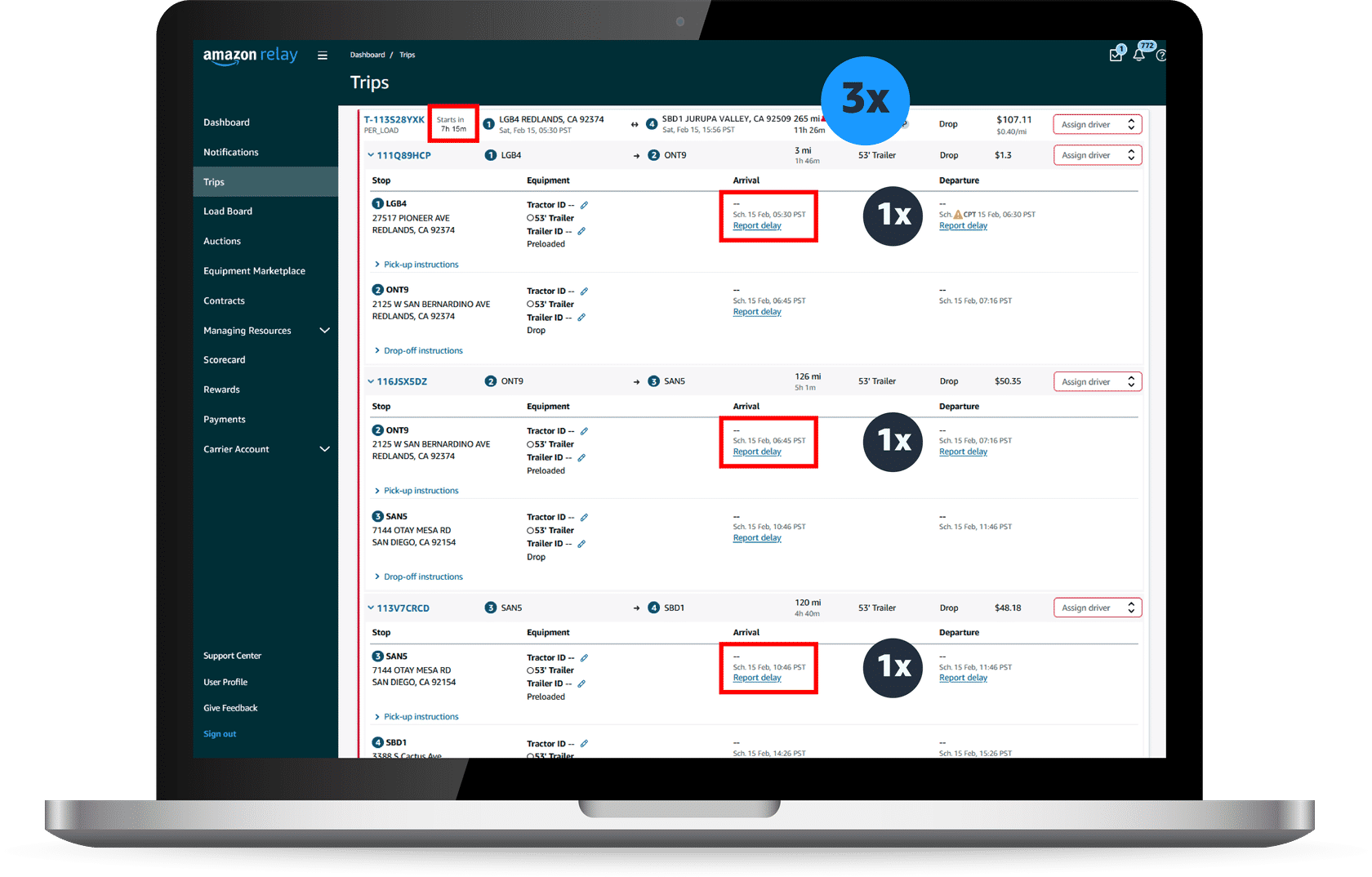
Rejections that occur more than 6 hours before SAT will be penalized one time (1x) the rejection penalty amount.
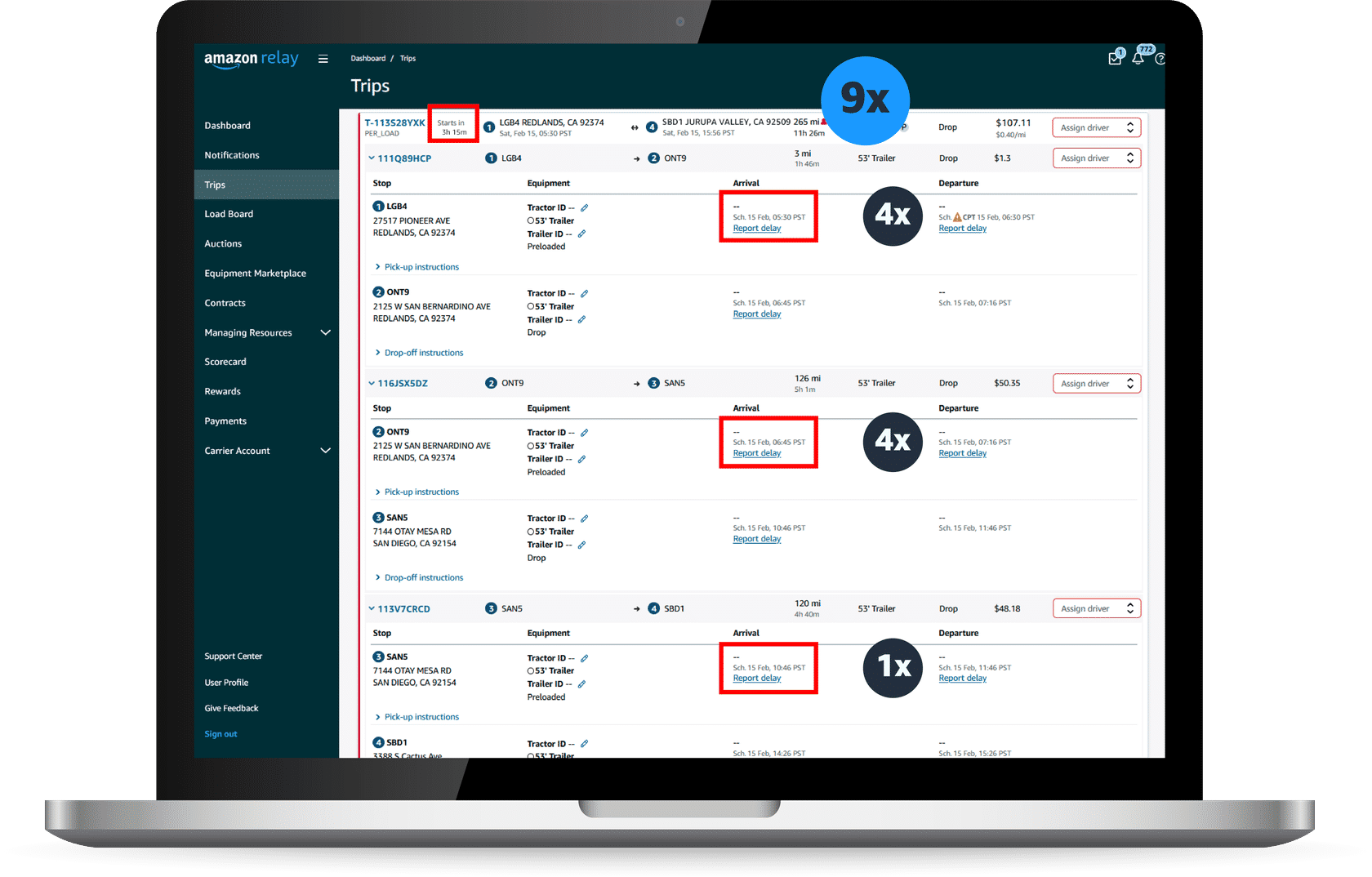
In the example below, there are three legs within this trip. Each of these legs would have a 1x penalty. Rejecting this trip would result in a 3x penalty (1x+1x+1x).
Rejections that occur less than 6 hours from SAT will be penalized four times (4x) the rejection penalty amount.
In the example below, the first two legs are less than 6 hours. We know this because there are only 3h15m before the load starts and the second leg begins 1h15m after the first. 3h15 + 1h15m = 4h30m, which is still less than 6 hours.
The remaining load is still more than 6 hours away. We know this because the third leg begins 4h01m after the second. 4h30m + 4h01m = 8h31m, which is more than 6 hours.
This means that the first two legs will receive a 4x penalty, while the last leg will receive a 1x penalty. Rejecting this trip would result in a 9x penalty (4x+4x+1x).
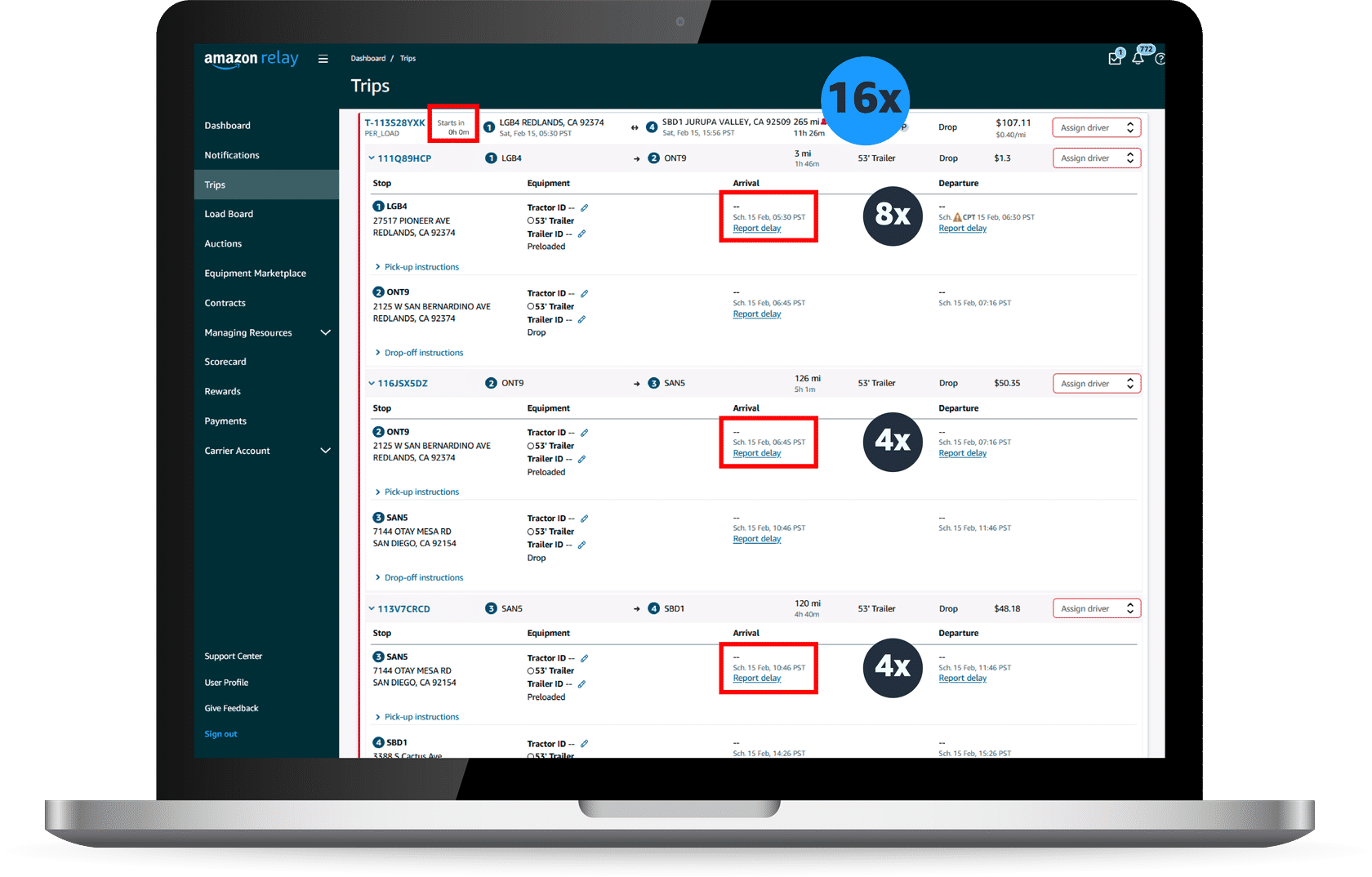
Rejections that occur at or after SAT has occurred are penalized eight times (8x).
In the example below, the first leg is at or after SAT. We know this because the time until departure is 0h0m.
The next two legs are less than 6 hours from SAT. We know this because the third leg begins 5h16m after the first (1h15m + 4h01m = 5h16m).
This means the first leg would receive an 8x penalty, while the last two legs would receive a 4x penalty. Rejecting this trip would result in a 16x penalty (8x+4x+4x).
Note: When ROC rejects individual legs on your company’s behalf, the rejections will still be counted against your company’s Acceptance Score based on the time left until SAT (i.e. – 1x, 4x, or 8x).
Once trips are accepted and available in your account you can only reject the entire load.
Contracts are booked on the Contracts page, or awarded to your company after winning an auction.
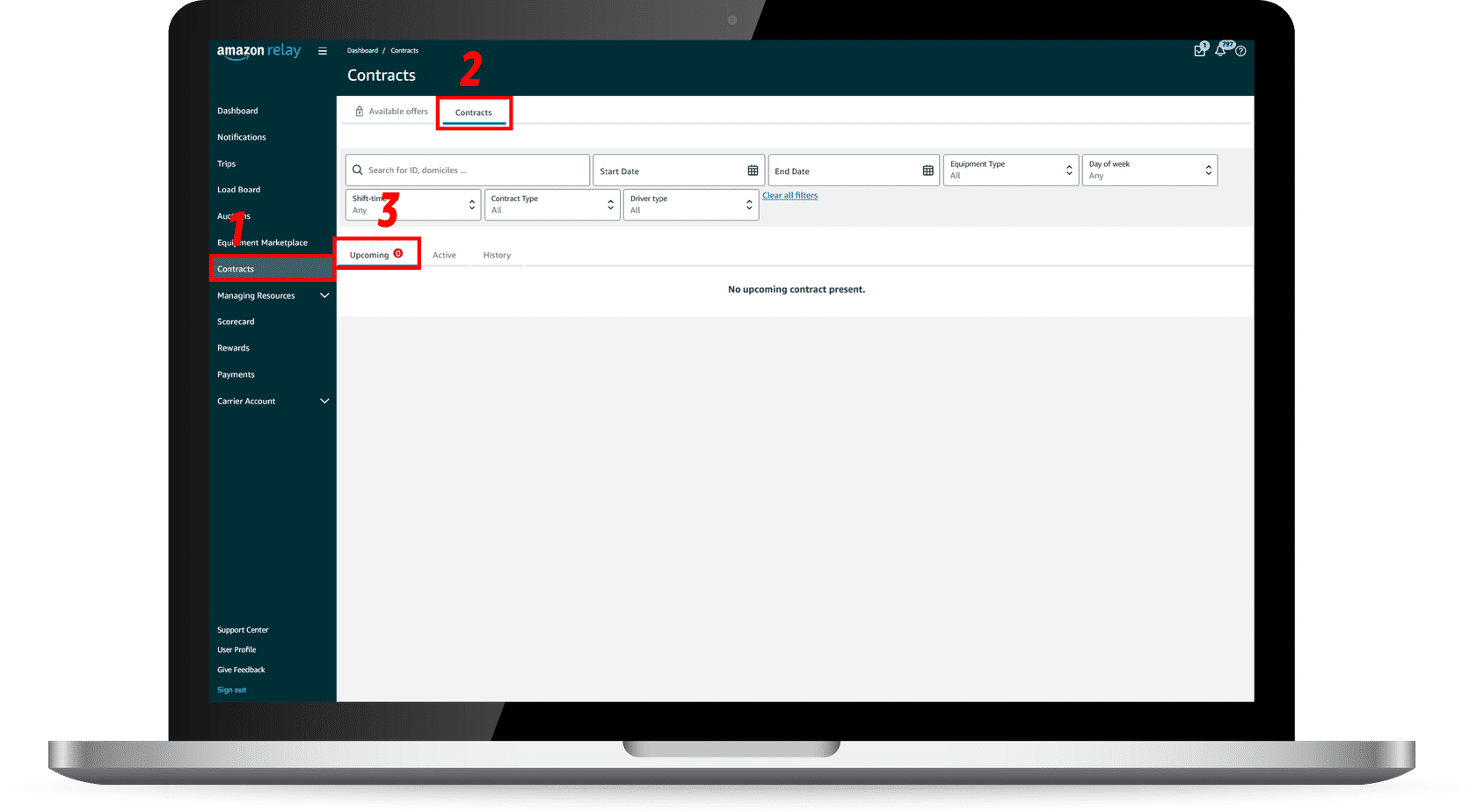
To find contracts in your Relay account that are booked for the future, follow the steps listed below:

The process for rejecting a contract is similar to rejecting blocks and loads. The only difference is you will begin on the Contracts page, and not on the Trips page. Below are two screenshots – one showing what happens when you hold the cursor over the Reject button and one that shows the Reject Contract pop-up.
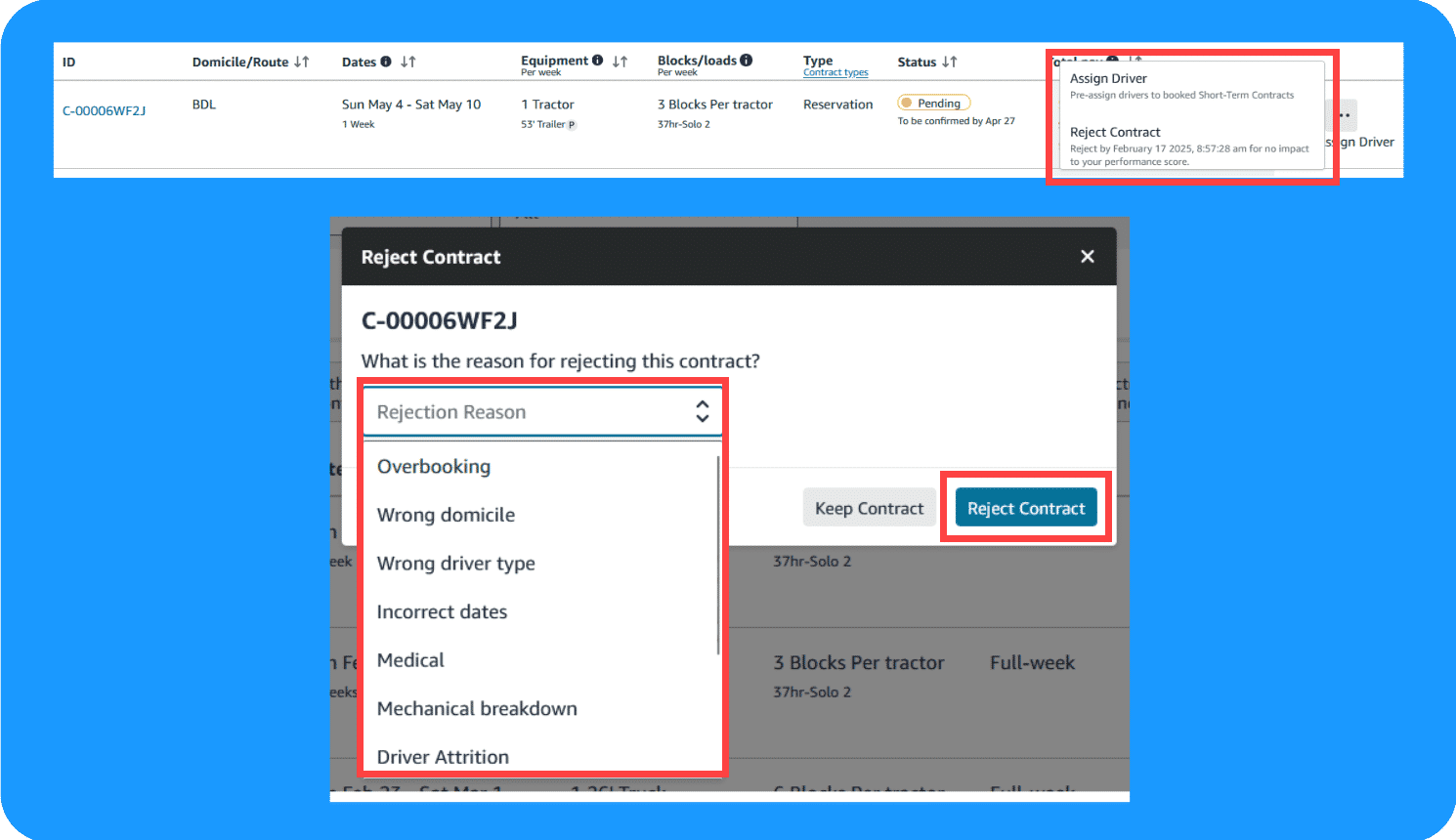
Press the tab below to learn more.
For contracts booked on the Contracts page:
Contracts are automatically accepted and sent to your Upcoming tab.
Your company has until 11:59 PM PST on the Tuesday before the first week of execution to reject a full contract. Additionally, your company can reject only Standby contracts till 6:00 PM PST, Saturday, before the week of execution. For a multi-week contract that has already started and is ongoing, your company can reject that contract’s future work. After that Tuesday, you should reject blocks or loads. Any tendered work such as blocks, loads, or trips cannot be rejected here and need to be rejected individually on the trips page. Multi-week block and load rejections will have a higher impact on your company’s Acceptance Score.
For a multi-week contract, if it’s after the Tuesday prior to the contract’s starting week, you can reject the entire work for future weeks, but not the upcoming week. For example, in a 3-week contract, you might not be able to reject the entirety of the work in Week 1, but you will be able to reject work for Weeks 2 and 3.
All Box Truck contracts can only be rejected via the Support Center currently – create a new case within the Support Center and select the Contracts topic.
Remember: Contracts rejected within one day (24 hours) of booking have no Acceptance Score impact, but after rejections after that do.
For Contracts sent to your company after winning an auction:
You need to accept it on your Upcoming tab.
If Amazon doesn’t receive a response in 3 hours, the contract is rejected, and there is an Acceptance Score impact.
Remember: Rejecting contracts with a start date more than 3 weeks away has a 1x Acceptance Score impact, whereas a rejection within 3 weeks has a 2x impact.
Note: Contracts booked on the Contracts page are automatically accepted if no action is taken. Contracts sent to your company after winning an auction are automatically rejected if no action is taken within 3 hours.
Once a contract is accepted, it will go to the contracts page. Blocks and loads will be tendered to that contract on the Trips page starting Friday before the execution week, where they can be rejected.
Note: Blocks for Standby contracts will not be tendered for on the Trips page because the start time, date, and location were already shown upfront while booking Standby contracts.
Rejecting contracts with a start date more than 3 weeks away has a 1x Acceptance Score impact. Rejecting within 3 weeks impacts 2x, and at or after the SAT, will result in a 4x impact.
Rejections impact your company’s Acceptance Score. A low Performance Score can result in lost access to Relay programs or features, such as the load board.